EC2, Ansible і SSM: хто кого?

Привіт! Мене звати Artem Hrechanychenko.
Я Lead SRE в TEMABIT Software Development та AWS Community Builder.
У вільний час я веду різні навчальні активності в DevOps 01 та YouTube-канал DevOps01, де ділюсь практичним досвідом з AWS, Kubernetes, CI/CD, Terraform і волонтерю для ЗСУ. Якщо вам цікавий розбір інструментів - цей пост для вас.
Ansible, знімай накидку - ми тебе впізнали! 😄
Натхненний лабою AWS Skill Builder «Using the AWS Systems Manager Run Command for Automation», я вирішив трошки препарувати AWS Systems Manager (SSM) Run Command, порівняти його з Ansible і показати, що там насправді відбувається «під капотом». Бо будь-який новий інструмент легше зрозуміти, якщо порівняти його з тим, що вже знайоме.
EC2: що ми з ним зазвичай робимо?
- Post-installation configuration (встановлення софту, конфіги, користувачі)
- Day 2 operations (patching, security hardening, etc.)
Як це можна вирішити?
✅ Post-installation configuration: user-data
Класика. Пхаємо shell-скрипт під час створення інстансу - і воно щось виконує.
📁 Скрипт потрапляє сюди:
/var/lib/cloud/instances/<instance-id>/📄 Лог - тут:
/var/log/cloud-init-output.log⚠️ Мінуси:
- Працює лише один раз, під час створення
- Щоб побачити результат, треба лізти на сам інстанс
- Якщо щось не так, дебажити незручно
🛠️ Day 2 operations: Ansible
Це вже потужніше. Створюємо playbook, наприклад:
- name: Restart nginx
  hosts: web
  tasks:
    - name: Restart service
      ansible.builtin.command: apk||dnf|| whatever cli - update something
Працює - так. Гнучко - так. Але треба:
- Менеджер-ноду з Ansible (GitLab runner, EC2, контейнер…) - нам потрібно десь екзекьютити процес ansible-playbook.
- Inventory (динамічний або статичний) - якось заповнити, відфільтрувати за тегами?
- Відкритий SSH (і ключі до нього). Можна обійти, взявши оберемок костилів: ssh на іншому порту, гітлаб-ранер у приватній мережі - тоді секьюріті-групу не потрібно проколювати в публічному сабнеті.
⚠️ Мінуси:
- Треба підтримувати ssh-доступи
- Відкриті порти = ризики
- Python на таргеті обов’язковий
- Це не модно 😏
🎭 А тут з’являється SSM
Ansible, знімай маску - ми тебе впізнали 😏
Жартую, але за функціональним призначенням SSM вирішує всі ті самі задачі.
SSM - це не push, а pull-модель:
- SSM agent (встановлений в Amazon Linux або доставиш самостійно);
- EC2 повинен мати IAM-роль із політикою AmazonSSMManagedInstanceCore;
- агент повинен достукатися до SSM endpoint (через NAT до публічного або через VPC endpoint for SSM).
🔎 Як це виглядає в SSM
- Керуєш зоопарком машин через Fleet Manager або Resource Groups
- Обираєш інстанси для запуску за тегами / instance-id / resource group
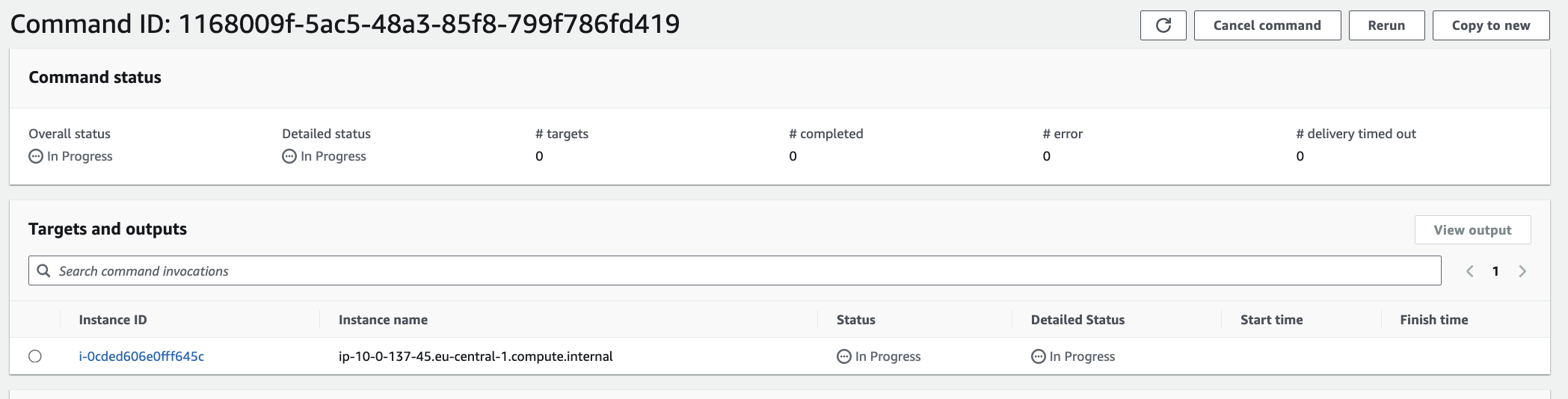
- Запускаєш Run Command або Automation
- Все логується, все моніториться, все свистить - SSH не потрібен
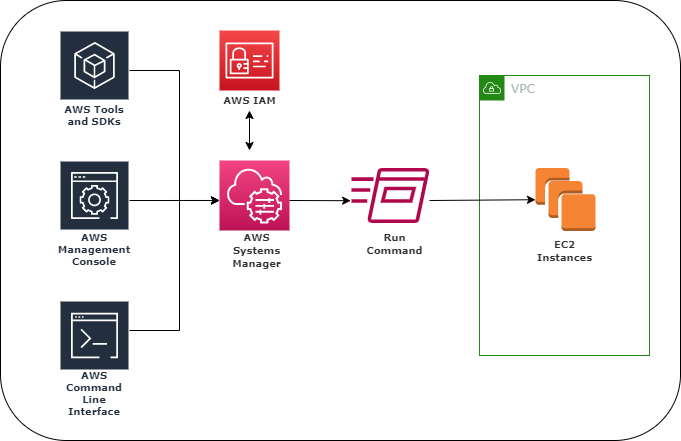
🧪 Демка: встановлення Apache + curl для тесту
Мета: встановити Apache, створити index.html з INSTANCE ID і зробити curl localhost. (Простий приклад - так, але ускладнення давайте вже іншим разом.)
Скрипт, який передаємо в AWS-RunShellScript:
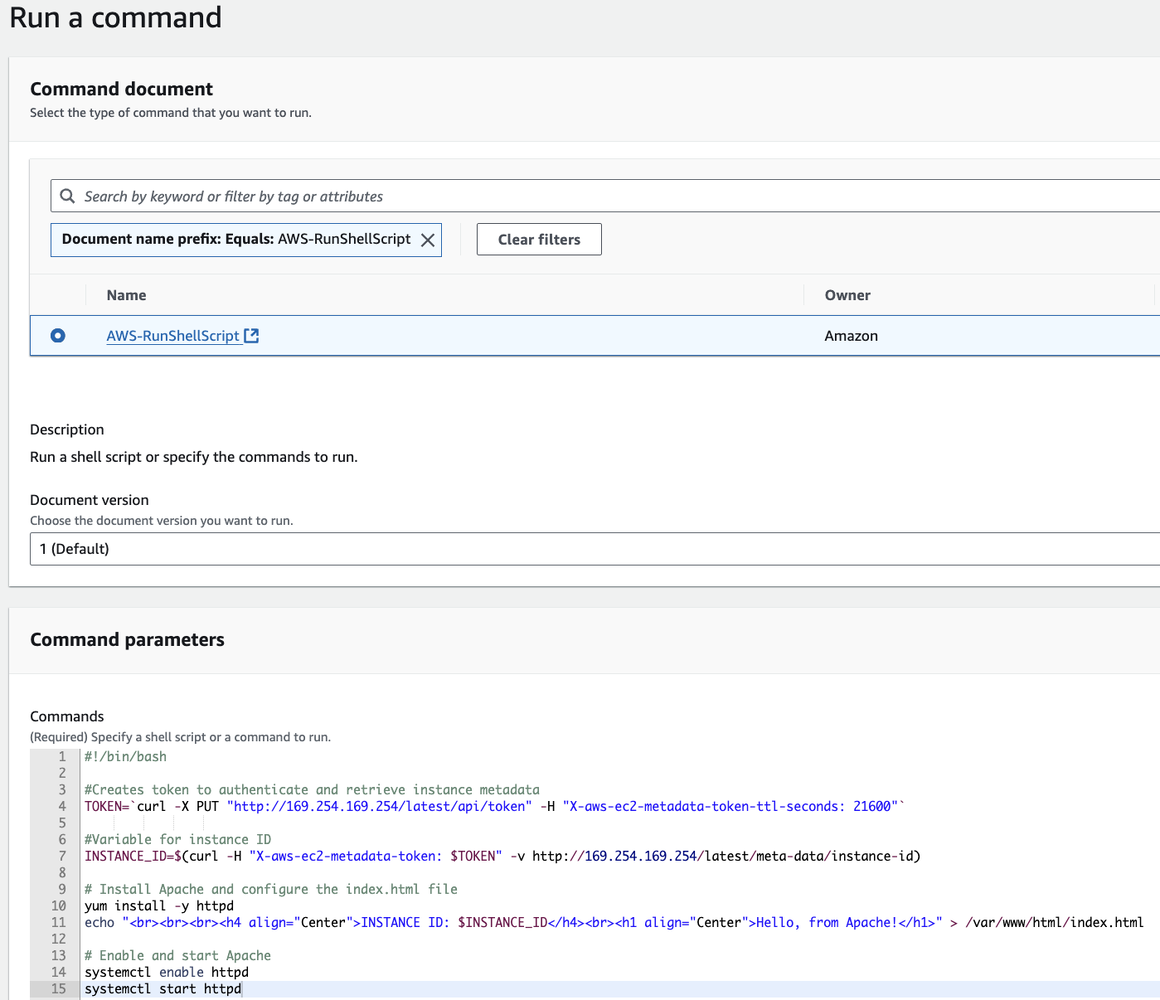
#!/bin/bash
TOKEN=`curl -X PUT "http://169.254.169.254/latest/api/token" \
    -H "X-aws-ec2-metadata-token-ttl-seconds: 21600"`
INSTANCE_ID=$(curl -H "X-aws-ec2-metadata-token: $TOKEN" \
    http://169.254.169.254/latest/meta-data/instance-id)
yum install -y httpd
echo "<h1>Hello, from Apache! INSTANCE ID: $INSTANCE_ID</h1>" > /var/www/html/index.html
systemctl enable httpd
systemctl start httpd
curl localhost
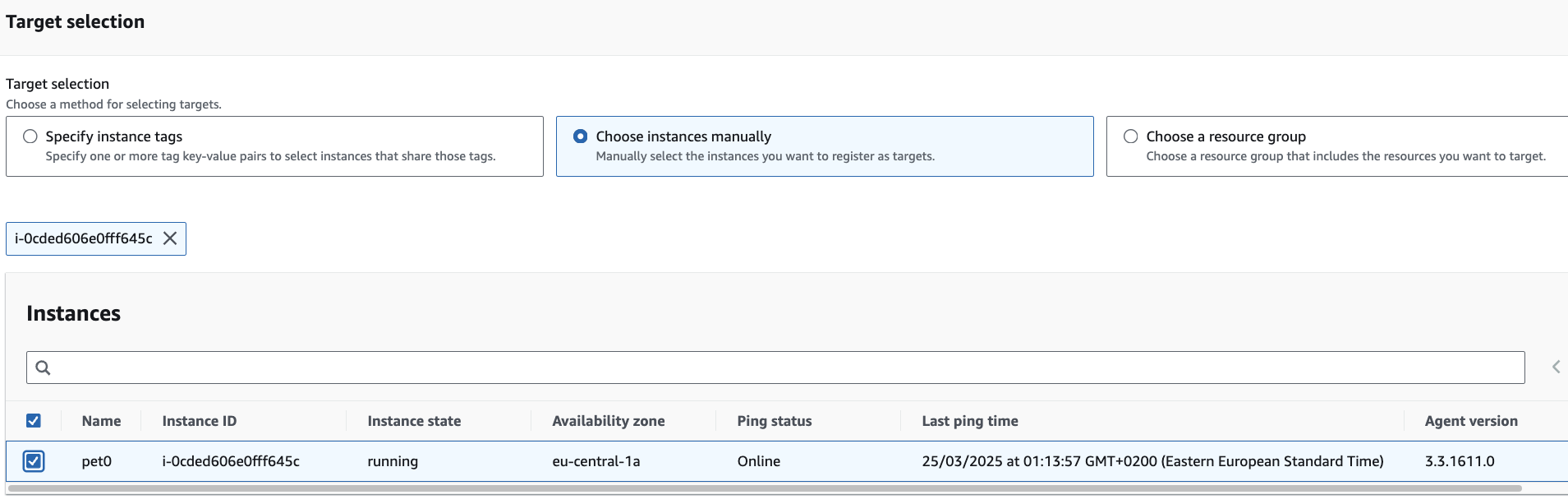
Інтерфейс SSM дозволяє обрати інстанси за тегом або resource group.
🔧 А що під капотом?

SSM agent - це systemd-сервіс:
systemctl status amazon-ssm-agent

amazon-ssm-agent.service - amazon-ssm-agent
     Loaded: loaded (/usr/lib/systemd/system/amazon-ssm-agent.service; enabled; preset: enabled)
     Active: active (running) since Mon 2025-03-24 21:21:09 UTC; 49min ago
   Main PID: 2142 (amazon-ssm-agen)
      Tasks: 34 (limit: 1111)
     Memory: 200.7M
        CPU: 2min 21.739s
     CGroup: /system.slice/amazon-ssm-agent.service
             ├─ 2142 /usr/bin/amazon-ssm-agent
             ├─ 2189 /usr/bin/ssm-agent-worker
             ├─65202 /usr/bin/ssm-session-worker a.hrechanychenko@devops01.xyz-sdf24rk2ldafalsdfxxxxx
             └─65214 sh
Усі логи дивимося в tail -F /var/log/amazon/ssm/amazon-ssm-agent.log.
Володарю, є шось, шо я можу для тебе виконати?
2025-03-24 23:13:07.7055 INFO [ssm-session-worker] [a.hrechanychenko@x-6y2engpcr3t4zij86bn7g53v5q] [DataBackend] [pluginName=Standard_Stream] Successfully opened websocket connection to: 52.94.138.245:443
2025-03-24 23:13:07.7057 INFO [ssm-session-worker] [a.hrechanychenko@tx-6y2engpcr3t4zij86bn7g53v5q] [DataBackend] [pluginName=Standard_Stream] Skipping handshake.
2025-03-24 23:13:07.7059 INFO [ssm-session-worker] [a.hrechanychenko@x-6y2engpcr3t4zij86bn7g53v5q] [DataBackend] [pluginName=Standard_Stream] Starting websocket pinger
2025-03-24 23:13:07.7059 INFO [ssm-session-worker] [a.hrechanychenko@tx-6y2engpcr3t4zij86bn7g53v5q] [DataBackend] [pluginName=Standard_Stream] Starting websocket listener
2025-03-24 23:13:07.7059 INFO [ssm-session-worker] [a.hrechanychenko@tx-6y2engpcr3t4zij86bn7g53v5q] [DataBackend] [pluginName=Standard_Stream] Starting command executor
2025-03-24 23:13:07.7113 INFO [ssm-session-worker] [a.hrechanychenko@x-6y2engpcr3t4zij86bn7g53v5q] [DataBackend] [pluginName=Standard_Stream] ssm-user already exists.
2025-03-24 23:13:07.7209 INFO [ssm-session-worker] [a.hrechanychenko@tx-6y2engpcr3t4zij86bn7g53v5q] [DataBackend] [pluginName=Standard_Stream] Plugin Standard_Stream started
2025-03-24 23:13:57.0578 INFO [ssm-agent-worker] [HealthCheck] HealthCheck reporting agent health.
2025-03-24 23:13:57.0639 INFO [ECSIdentity] Agent not taking ECS identity: Could not fetch metadata endpoint
2025-03-24 23:16:10.8471 INFO [ssm-agent-worker] [MessageService] [Association] Next association is scheduled at 2025-03-24 23:29:30.947 +0000 UTC, association will wait for 13m20.099848939s
Ось тобі SSM Document у форматі JSON.
2025-03-24 23:17:53.3682 INFO [ssm-agent-worker] [MessageService] [MGSInteractor] Processing AgentMessage: MessageType - agent_job, Id - 4b961fa0-590c-460b-b979-bc45f14c5ee8
2025-03-24 23:17:53.3794 INFO ssm-document-worker - v3.3.1611.0
2025-03-24 23:17:53.3683 INFO [ssm-agent-worker] [MessageService] [MGSInteractor] Parsing AgentMessage 4b961fa0-590c-460b-b979-bc45f14c5ee8, Payload: {"schemaVersion":1,"jobId":"aws.ssm.1168009f-5ac5-48a3-85f8-799f786fd419.i-0cded606e0fff645c","topic":"aws.ssm.sendCommand","content":"{\"OutputS3KeyPrefix\":\"\",\"CloudWatchOutputEnabled\":\"false\",\"Parameters\":{\"executionTimeout\":\"3600\",\"workingDirectory\":\"\",\"commands\":[\"#!/bin/bash\",\"\",\"#Creates token to authenticate and retrieve instance metadata\",\"TOKEN\u003d`curl -X PUT \\\"http://169.254.169.254/latest/api/token\\\" -H \\\"X-aws-ec2-metadata-token-ttl-seconds: 21600\\\"`\",\"                    \",\"#Variable for instance ID\",\"INSTANCE_ID\u003d$(curl -H \\\"X-aws-ec2-metadata-token: $TOKEN\\\" -v http://169.254.169.254/latest/meta-data/instance-id)\",\"\",\"# Install Apache and configure the index.html file\",\"yum install -y httpd\",\"echo \\\"\u003cbr\u003e\u003cbr\u003e\u003cbr\u003e\u003ch4 align\u003d\\\"Center\\\"\u003eINSTANCE ID: $INSTANCE_ID\u003c\\/h4\u003e\u003cbr\u003e\u003ch1 align\u003d\\\"Center\\\"\u003eHello, from Apache!\u003c\\/h1\u003e\\\" \u003e /var/www/html/index.html\",\"\",\"# Enable and start Apache\",\"systemctl enable httpd\",\"systemctl start httpd\"]},\"DocumentContent\":{\"schemaVersion\":\"1.2\",\"description\":\"Run a shell script or specify the commands to run.\",\"runtimeConfig\":{\"aws:runShellScript\":{\"properties\":[{\"workingDirectory\":\"{{ workingDirectory }}\",\"timeoutSeconds\":\"{{ executionTimeout }}\",\"runCommand\":\"{{ commands }}\",\"id\":\"0.aws:runShellScript\"}]}},\"parameters\":{\"executionTimeout\":{\"default\":\"3600\",\"description\":\"(Optional) The time in seconds for a command to complete before it is considered to have failed. Default is 3600 (1 hour). Maximum is 172800 (48 hours).\",\"type\":\"String\",\"allowedPattern\":\"([1-9][0-9]{0,4})|(1[0-6][0-9]{4})|(17[0-1][0-9]{3})|(172[0-7][0-9]{2})|(172800)\"},\"workingDirectory\":{\"default\":\"\",\"description\":\"(Optional) The path to the working directory on your instance.\",\"maxChars\":4096,\"type\":\"String\"},\"commands\":{\"minItems\":1,\"displayType\":\"textarea\",\"description\":\"(Required) Specify a shell script or a command to run.\",\"type\":\"StringList\"}}},\"CloudWatchLogGroupName\":\"\",\"OutputS3Region\":\"eu-central-1\",\"CommandId\":\"1168009f-5ac5-48a3-85f8-799f786fd419\",\"OutputS3BucketName\":\"\",\"DocumentName\":\"AWS-RunShellScript\"}"}
Автентифікується в IAM і каже: «Я пішов робити таску!!»
2025-03-24 23:17:53.3795 INFO picking up runtime config identity selector
2025-03-24 23:17:53.3688 INFO [ssm-agent-worker] [MessageService] [EngineProcessor] document aws.ssm.1168009f-5ac5-48a3-85f8-799f786fd419.i-0cded606e0fff645c submission started
2025-03-24 23:17:53.3795 INFO Checking if agent identity type OnPrem can be assumed
2025-03-24 23:17:53.3691 INFO [ssm-agent-worker] [MessageService] [EngineProcessor] document aws.ssm.1168009f-5ac5-48a3-85f8-799f786fd419.i-0cded606e0fff645c submission ended
2025-03-24 23:17:53.3796 INFO Checking if agent identity type EC2 can be assumed
2025-03-24 23:17:53.3691 INFO [ssm-agent-worker] [MessageService] [CommandProcessorWrapper] [Idempotency] writing command in the idempotency directory for command 1168009f-5ac5-48a3-85f8-799f786fd419
2025-03-24 23:17:53.4210 INFO Agent will take identity from EC2

2025-03-24 23:17:53.3692 INFO [ssm-agent-worker] [MessageService] [MGSInteractor] Sending reply {
  "additionalInfo": {
    "agent": {
      "lang": "en-US",
      "name": "amazon-ssm-agent",
      "os": "",
      "osver": "1",
      "ver": ""
    },
    "dateTime": "2025-03-24T23:17:53.369Z",
    "runId": "",
    "runtimeStatusCounts": null
  },
  "documentStatus": "InProgress",
  "documentTraceOutput": "",
  "runtimeStatus": null
}
Конвертує SSM Document у форматі JSON від SSM Service у шел-скрипт у каталозі відповідно до темплейту нашого SSM Document, бо потрібно дьорнути потрібний «провайдер/plugin» -
aws:runShellScript:
2025-03-24 23:17:53.4210 INFO [ssm-document-worker] [1168009f-5ac5-48a3-85f8-799f786fd419] document: 1168009f-5ac5-48a3-85f8-799f786fd419 worker started

2025-03-24 23:17:53.3709 INFO [ssm-agent-worker] [MessageService] [EngineProcessor] [BasicExecuter] [1168009f-5ac5-48a3-85f8-799f786fd419] inter process communication started at /var/lib/amazon/ssm/i-0cded606e0fff645c/channels/1168009f-5ac5-48a3-85f8-799f786fd419

...

2025-03-24 23:17:53.3787 INFO [ssm-agent-worker] [MessageService] [MGSInteractor] Processing AgentMessage: MessageType - agent_job_reply_ack, Id - 3784ef6d-e302-4f9d-8452-51d492b4623f

...

...
2025-03-24 23:17:53.4221 INFO [ssm-document-worker] [1168009f-5ac5-48a3-85f8-799f786fd419] Successfully loaded platform dependent plugin aws:runShellScript
...
2025-03-24 23:17:53.4221 INFO [ssm-document-worker] [1168009f-5ac5-48a3-85f8-799f786fd419] inter process communication started at /var/lib/amazon/ssm/i-0cded606e0fff645c/channels/1168009f-5ac5-48a3-85f8-799f786fd419
2025-03-24 23:17:53.4396 INFO [ssm-document-worker] [1168009f-5ac5-48a3-85f8-799f786fd419] [DataBackend] received plugin config message

2025-03-24 23:17:53.4397 INFO [ssm-document-worker] [1168009f-5ac5-48a3-85f8-799f786fd419] [DataBackend] {"DocumentInformation":{"DocumentID":"1168009f-5ac5-48a3-85f8-799f786fd419","CommandID":"1168009f-5ac5-48a3-85f8-799f786fd419","AssociationID":"","InstanceID":"i-0cded606e0fff645c","MessageID":"aws.ssm.1168009f-5ac5-48a3-85f8-799f786fd419.i-0cded606e0fff645c","RunID":"2025-03-24T23-17-53.368Z","CreatedDate":"57198-12-24 18:09:26 +0000 UTC","DocumentName":"AWS-RunShellScript","DocumentVersion":"","DocumentStatus":"InProgress","RunCount":0,"ProcInfo":{"Pid":69052,"StartTime":"2025-03-24T23:17:53.369702231Z"},"ClientId":"","RunAsUser":"","SessionOwner":""},"DocumentType":"SendCommand","SchemaVersion":"1.2","InstancePluginsInformation":[{"Configuration":{"Settings":null,"Properties":[{"id":"0.aws:runShellScript","runCommand":["#!/bin/bash","","#Creates token to authenticate and retrieve instance metadata","TOKEN=`curl -X PUT \"http://169.254.169.254/latest/api/token\" -H \"X-aws-ec2-metadata-token-ttl-seconds: 21600\"`","                    ","#Variable for instance ID","INSTANCE_ID=$(curl -H \"X-aws-ec2-metadata-token: $TOKEN\" -v http://169.254.169.254/latest/meta-data/instance-id)","","# Install Apache and configure the index.html file","yum install -y httpd","echo \"\u003cbr\u003e\u003cbr\u003e\u003cbr\u003e\u003ch4 align=\"Center\"\u003eINSTANCE ID: $INSTANCE_ID\u003c/h4\u003e\u003cbr\u003e\u003ch1 align=\"Center\"\u003eHello, from Apache!\u003c/h1\u003e\" \u003e /var/www/html/index.html","","# Enable and start Apache","systemctl enable httpd","systemctl start httpd"],"timeoutSeconds":"3600","workingDirectory":""}],"OutputS3KeyPrefix":"1168009f-5ac5-48a3-85f8-799f786fd419/i-0cded606e0fff645c/awsrunShellScript","OutputS3BucketName":"","S3EncryptionEnabled":false,"CloudWatchLogGroup":"","CloudWatchEncryptionEnabled":false,"CloudWatchStreamingEnabled":false,"OrchestrationDirectory":"/var/lib/amazon/ssm/i-0cded606e0fff645c/document/orchestration/1168009f-5ac5-48a3-85f8-799f786fd419/awsrunShellScript","MessageId":"aws.ssm.1168009f-5ac5-48a3-85f8-799f786fd419.i-0cded606e0fff645c","BookKeepingFileName":"1168009f-5ac5-48a3-85f8-799f786fd419","PluginName":"aws:runShellScript","PluginID":"aws:runShellScript","DefaultWorkingDirectory":"","Preconditions":null,"IsPreconditionEnabled":false,"CurrentAssociations":null,"SessionId":"","ClientId":"","KmsKeyId":"","RunAsEnabled":false,"RunAsUser":"","ShellProfile":{"windows":"","linux":""},"SessionOwner":"","UpstreamServiceName":""},"Name":"aws:runShellScript","Result":{"pluginID":"","pluginName":"","status":"","code":0,"output":null,"startDateTime":"0001-01-01T00:00:00Z","endDateTime":"0001-01-01T00:00:00Z","outputS3BucketName":"","outputS3KeyPrefix":"","stepName":"","error":"","standardOutput":"","standardError":""},"Id":"aws:runShellScript"}],"CancelInformation":{"CancelMessageID":"","CancelCommandID":"","Payload":"","DebugInfo":""},"IOConfig":{"OrchestrationDirectory":"/var/lib/amazon/ssm/i-0cded606e0fff645c/document/orchestration/1168009f-5ac5-48a3-85f8-799f786fd419","OutputS3BucketName":"","OutputS3KeyPrefix":"1168009f-5ac5-48a3-85f8-799f786fd419/i-0cded606e0fff645c","CloudWatchConfig":{"LogGroupName":"","LogStreamPrefix":"","LogGroupEncryptionEnabled":false}},"UpstreamServiceName":"MessageGatewayService"}

2025-03-24 23:17:53.4400 INFO [ssm-document-worker] [1168009f-5ac5-48a3-85f8-799f786fd419] [DataBackend] Running plugin aws:runShellScript aws:runShellScript
2025-03-24 23:17:53.4401 INFO [ssm-document-worker] [1168009f-5ac5-48a3-85f8-799f786fd419] [DataBackend] [pluginName=aws:runShellScript] aws:runShellScript started with configuration {<nil> map[id:0.aws:runShellScript runCommand:[#!/bin/bash  #Creates token to authenticate and retrieve instance metadata TOKEN=`curl -X PUT "http://169.254.169.254/latest/api/token" -H "X-aws-ec2-metadata-token-ttl-seconds: 21600"`                      #Variable for instanceID INSTANCE_ID=$(curl -H "X-aws-ec2-metadata-token: $TOKEN" -v http://169.254.169.254/latest/meta-data/instance-id)  # Install Apache and configure the index.html file yum install -y httpd echo "<br><br><br><h4 align="Center">INSTANCE ID: $INSTANCE_ID</h4><br><h1 align="Center">Hello, from Apache!</h1>" > /var/www/html/index.html  # Enable and start Apache systemctl enable httpd systemctl start httpd] timeoutSeconds:3600 workingDirectory:] 1168009f-5ac5-48a3-85f8-799f786fd419/i-0cded606e0fff645c/awsrunShellScript  false  false false /var/lib/amazon/ssm/i-0cded606e0fff645c/document/orchestration/1168009f-5ac5-48a3-85f8-799f786fd419/awsrunShellScript aws.ssm.1168009f-5ac5-48a3-85f8-799f786fd419.i-0cded606e0fff645c 1168009f-5ac5-48a3-85f8-799f786fd419 aws:runShellScript aws:runShellScript  map[] false []    false  { }  MessageGatewayService}
Все готово!!
2025-03-24 23:17:54.2318 INFO [ssm-document-worker] [1168009f-5ac5-48a3-85f8-799f786fd419] [DataBackend] Sending plugin aws:runShellScript completion message
2025-03-24 23:17:54.2320 INFO [ssm-document-worker] [1168009f-5ac5-48a3-85f8-799f786fd419] [DataBackend] document execution complete
2025-03-24 23:17:54.2320 INFO [ssm-document-worker] [1168009f-5ac5-48a3-85f8-799f786fd419] [DataBackend] sending document complete response...
2025-03-24 23:17:54.2321 INFO [ssm-document-worker] [1168009f-5ac5-48a3-85f8-799f786fd419] [DataBackend] stopping ipc worker...
2025-03-24 23:17:54.2321 INFO [ssm-document-worker] [1168009f-5ac5-48a3-85f8-799f786fd419] requested shutdown, prepare to stop messaging
2025-03-24 23:17:54.2322 INFO [ssm-document-worker] [1168009f-5ac5-48a3-85f8-799f786fd419] worker listener stopped on path: /var/lib/amazon/ssm/i-0cded606e0fff645c/channels/1168009f-5ac5-48a3-85f8-799f786fd419
2025-03-24 23:17:54.2326 INFO [ssm-document-worker] [1168009f-5ac5-48a3-85f8-799f786fd419] document worker closed
2025-03-24 23:17:53.3787 WARN [ssm-agent-worker] [MessageService] [MGSInteractor] acknowledgement b2359a31-31a5-4c21-82b9-7964dab01ca3 received but could not find any reply threads running
2025-03-24 23:17:54.2326 INFO [ssm-agent-worker] [MessageService] [EngineProcessor] [BasicExecuter] [1168009f-5ac5-48a3-85f8-799f786fd419] requested terminate messaging worker, destroying the channel
2025-03-24 23:17:54.2333 INFO [ssm-agent-worker] [MessageService] [EngineProcessor] sending document: 1168009f-5ac5-48a3-85f8-799f786fd419 complete response
2025-03-24 23:17:54.2333 INFO [ssm-agent-worker] [MessageService] [CommandProcessorWrapper] received plugin: aws:runShellScript result from Processor
2025-03-24 23:17:54.2333 INFO [ssm-agent-worker] [MessageService] [CommandProcessorWrapper] command: aws.ssm.1168009f-5ac5-48a3-85f8-799f786fd419.i-0cded606e0fff645c complete
SSM Agent автентифікується через EC2 Instance profile, пулить команду, створює скрипт, виконує його й надсилає результат назад.
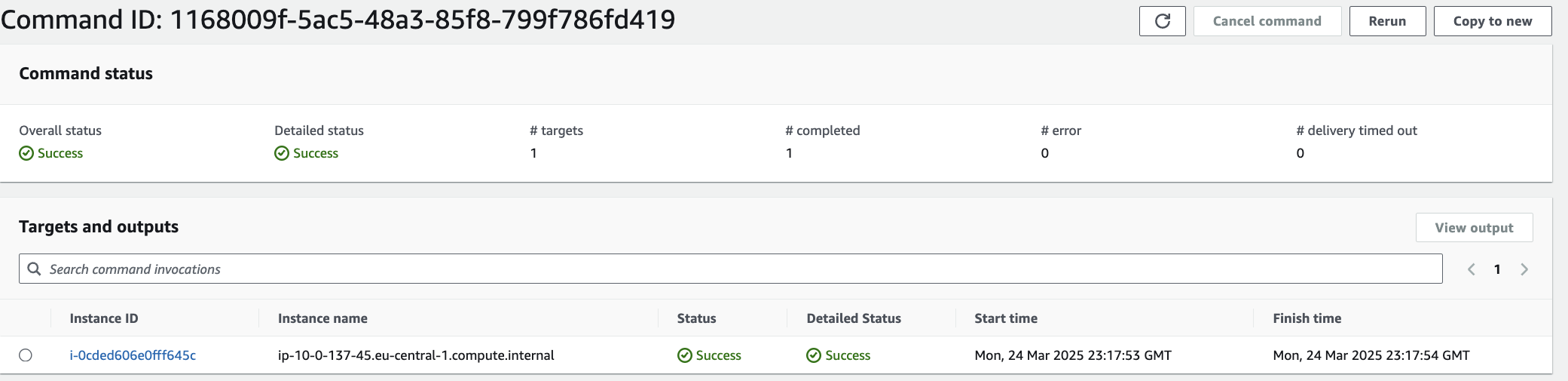
📦 Плюшки
- Працює без SSH
- Управління доступом через IAM
- Можна запускати через EventBridge
- Automation підтримує approvals, rollback, параметри
- Можна зберігати логи в CloudWatch або S3 (потребує ширшої IAM-ролі, ніж AWS SSM Instance Core)
🧠 Висновок
SSM Run Command & Automation вирішують усі звичні нам задачі:
- запуск ad-hoc commands;
- scheduling & cron-based automation;
- event-based automation (раніше тригерили пайплайн за комітом/вебхуком - маєте EventBridge і SSM target).
SSM - це не тільки Parameter Store та SSM connection на заміну вашому бастіон-хосту 😂
🎯 Якщо ти вже в AWS, SSM може покрити 80% задач без Ansible / user-data.
А якщо хочеш побачити це у вигляді воркшопу чи YouTube-відео, то потрібно буде трохи задонатити на мою банку зборів для ЗСУ.
https://send.monobank.ua/jar/5fYjQVfvFA

Посилання
- https://docs.aws.amazon.com/systems-manager/latest/userguide/what-is-systems-manager.html
- https://docs.aws.amazon.com/systems-manager/latest/userguide/run-command.html
- https://docs.aws.amazon.com/systems-manager/latest/userguide/ssm-agent.html
- https://docs.aws.amazon.com/systems-manager/latest/userguide/fleet-manager.html
Вперше опубліковано на LinkedIn 25 березня 2025 р.: оригінал.